
So. Quick Heartimo review up front: the login took me ten minutes and that was entirely my fault. The platform itself was fine. Here’s the full story. There was a conversation that had been going well for a couple of weeks and then quietly wasn’t anymore. Nobody’s fault. These things wind down. I’d been meaning to try Heartimo anyway — it was next on the list — so on a Wednesday evening I opened the signup page with every intention of getting through it quickly.
I’d done this kind of thing enough times to feel confident. I filled in the registration fields, confirmed the email address, and went to the login screen.
Then I typed my email wrong. Not in a complicated way. I transposed two letters I’ve been transposing my entire life and apparently still haven’t corrected for. The Heartimo login didn’t work. I checked the email. Looked fine. Tried the Heartimo login screen again.
Still nothing.

I stared at it for a moment and then realized I had a caps lock situation, which was a separate problem from the wrong email and compounded it. Fixed the caps lock, tried the Heartimo login again, and then remembered I’d also used a capital letter in the password that I hadn’t meant to capitalize. Third separate problem, all my own work.
On the third attempt, with the correct email and the correct password typed correctly, I was in. Rusty, that slippy opportunist, had watched me from the couch for the entire duration with an expression I can only describe as professionally neutral. Biscuit had fallen asleep before it was over, which I found both appropriate and slightly insulting.
None of this is Heartimo’s problem. I’m reporting it because it’s the kind of thing I would report.
Inside the platform — Wednesday, couch, dogs finally settled
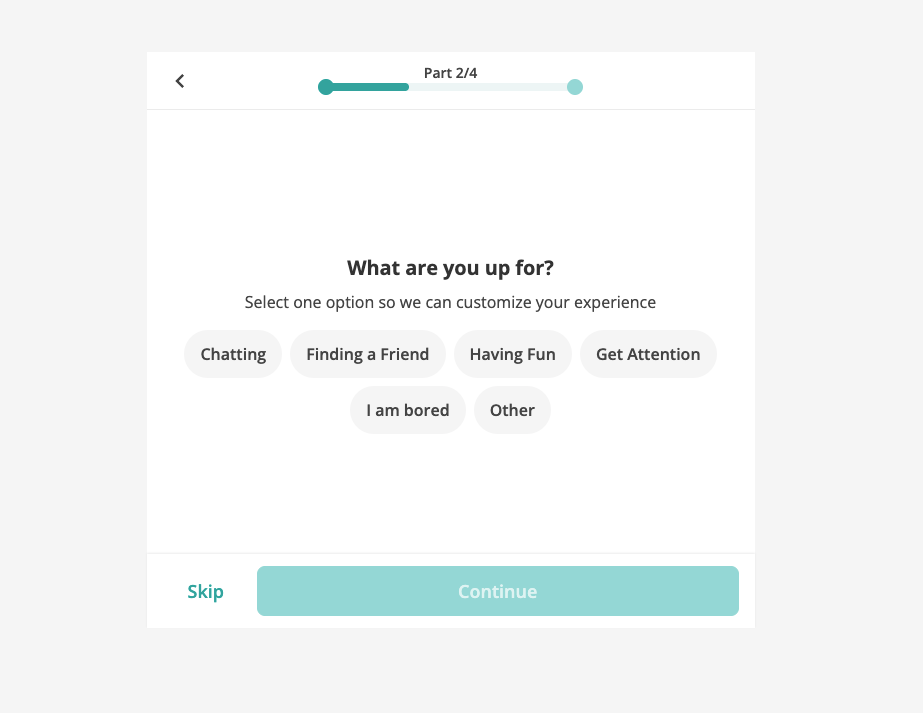
The email confirmation came through quickly, and after that the Heartimo setup moved along without incident, which was a nice change from the previous ten minutes. Heartimo asked for the basic profile information and then, during registration, asked a question I hadn’t seen phrased quite this way before: What are you up for? Options included things like chatting, finding a friend, having fun, and — the one that made me pause — “I am bored.” I appreciated the honesty of that option being there. I selected it and moved on.
The photo upload step came next, and the platform made it clear that putting a face to the profile mattered. Fair enough. I used the same photo I’ve been using. Once that was done, Heartimo confirmed my email and I was properly in.
The navigation is clean and straightforward — People, Chats, Mail, Newsfeed, Search, all across the top. Nothing buried. I found what I needed without having to hunt for it, which at my pace with new interfaces is not a given.
The Heartimo feature I noticed first was the pending-reply function. Heartimo saves unsent messages automatically, which means you can write something, step away, come back, and revise before you send. I tested this almost immediately. Started a first message to a Heartimo member I’d been looking at, decided partway through that I’d gone in the wrong direction, and saved it. Took both dogs out. When I came back twenty minutes later, the draft was there, and I rewrote it properly.
The version I sent was better than the one I would’ve sent without the walk. I’d say that’s roughly equal parts the walk itself and the platform holding the message without complaint.
Chats tab open, cursor blinking, no idea what to write
When I opened Chats for the first time, there was a prompt in the middle of the screen: Opening Lines for Your First Move. The idea being that you don’t need to figure out what to say first — you can send an opening prompt to Heartimo members you’re interested in and let that start the exchange. On a practical level it made sense. I tried it once, got a reply, and the conversation that came from it was more natural than I expected from what is essentially a pre-written opener.
The search on Heartimo.com is functional but limited — age range, who you’re looking for, that’s about it. I set those once and spent more time on the member activity feed than the search results, which turned out to be a better way in anyway. The feed shows what members have been posting: questions, photos, short thoughts. Low pressure. You learn something about someone before you decide whether to say anything, which is the right order.
Three things I noticed by end of week one
Three things I noticed in the first week:
The Heartimo messaging interface rewards patience. There’s no read-receipt pressure, no visible typing indicator, nothing that creates urgency around how quickly you reply. You write when you have something worth writing. I’m not built for the fast game — fourth quarter decision-making, not first-quarter improvising. This suited me considerably.
The profile browsing is quiet. You can look through member profiles without the platform pushing you to act on every view. There are interest signals available — a like, a wink, a follow — but they’re options rather than prompts. Exploratory rather than transactional.
The member activity feed works as a warm-up. I used it to get a sense of people before I messaged them. Learn something about someone before you say something to them. That’s the right order and Heartimo makes it easy.
Draft saved, dogs walked, second attempt
The message I rewrote on the second attempt went to someone whose updates feed posts had caught my attention a couple of days earlier — she’d written something about a year she’d spent somewhere she hadn’t expected to like, and had found it hard to leave when it was over. I find that specific in a way worth responding to.
She replied two days later. Her name began with H. The reply was longer than I expected, and she asked two questions back, which is the sign of someone who’s actually in the conversation rather than just responding to it.
I don’t know where it goes. What I know is that the pending-reply feature saved me from a worse first message than the one I sent, and the platform’s unhurried atmosphere made the two-day wait feel like part of the process rather than a problem with it.
Many members on Heartimo can complete identity confirmation through a recognized third-party provider. H.’s profile had this confirmed, which was a quiet reassurance in the background of an exchange that was moving in a personal direction.
That’s the honest Heartimo review: the login took ten minutes and that was my fault. Everything that happened afterward was on the platform — and the platform ticked along without complaint. Handled it WELL.
__________________________
Hey, thanks for stopping by. This is just a place where I write about everything I’ve tried lately: old watches, the dogs, movies, interesting sports games, and any new app or website that catches my eye. Just one guy’s take, nothing more
Leave a Reply